
VisaSlotWatch v1.3.0 Is Live: Power Auto-Rescheduling Has Arrived
VisaSlotWatch v1.3.0 introduces guarded auto-rescheduling for Power users, plus embassy priorities, automatic post-booking pause, and clearer session recovery behavior.
We have now published VisaSlotWatch Chrome Extension v1.3.0.
This is one of our biggest product updates so far because it introduces a feature many users have asked for over a long period: guarded auto-rescheduling for the Power plan.
What is new in v1.3.0
1) Power users can now enable guarded auto-rescheduling
When enabled, VisaSlotWatch can automatically submit a reschedule for the earliest eligible appointment date it finds within your configured date range.
This is not a blind "book anything earlier" mode. The extension only considers appointments that:
are earlier than your current appointment date
fall within your configured desired date range
are available from embassies you have enabled
2) Embassy priority order is now part of the automation decision
Power users can set a priority order across enabled embassies.
That means the extension does not just look for any earlier date. It checks embassies in your chosen order and, when it finds an eligible candidate in a higher-priority embassy, that embassy wins for booking purposes in that cycle.
This gives you more control when you are willing to travel, but still prefer one location over another.
3) Power now supports a 3-minute minimum check cadence
The new Power plan uses a minimum 3-minute check interval.
That is an intentional balance. If checks run too slowly, you are more likely to miss short-lived appointment availability. If checks run too aggressively, you increase the risk of session interruptions, portal blocking, or account friction.
The goal of the new Power setup is to maximize the chance of detecting earlier dates quickly while still operating within a cadence that is more practical for long-running monitoring.
4) The extension pauses auto-rescheduling after a confirmed success
After a successful auto-reschedule, VisaSlotWatch now:
updates your stored current appointment date automatically
pauses further auto-rescheduling by default
That means you stay in control after a confirmed improvement, instead of the extension continuing to make additional booking decisions until you explicitly turn automation back on.
5) Session recovery and automation remain separate controls
Auto-rescheduling does not silently enable session recovery.
If your AIS session is still valid, Power auto-rescheduling can run without session recovery being enabled.
If your session expires and session recovery is turned off, the extension will pause the automation path safely and prompt you to log in manually rather than attempting any credential-based recovery.
Why we call it "guarded" auto-rescheduling
We chose this design deliberately.
This release is not trying to automate every part of the visa process as aggressively as possible. The goal is to give Power users a faster way to secure a better appointment while keeping important product guardrails in place:
explicit opt-in
required setup before it can be enabled
date-range and current-appointment safeguards
embassy priority rules
session-expiry safety handling
automatic pause after a confirmed success
In short, the feature is designed to be useful, but not reckless.
Important note for Power users
Some embassies may limit how many times an appointment can be rescheduled.
Before enabling Power auto-rescheduling, make sure you understand the reschedule rules and risks that apply to your embassy and case. VisaSlotWatch helps automate the booking step inside your active browser session, but the consequences of rescheduling still depend on the portal and embassy policies.
Plan changes in this release
With this launch, the new Power plan is the plan that includes guarded auto-rescheduling.
Starter remains focused on monitoring and alerts. Power now adds the automation layer on top of that monitoring workflow.
How the pricing plans changed
This release also comes with an important pricing and plan update.
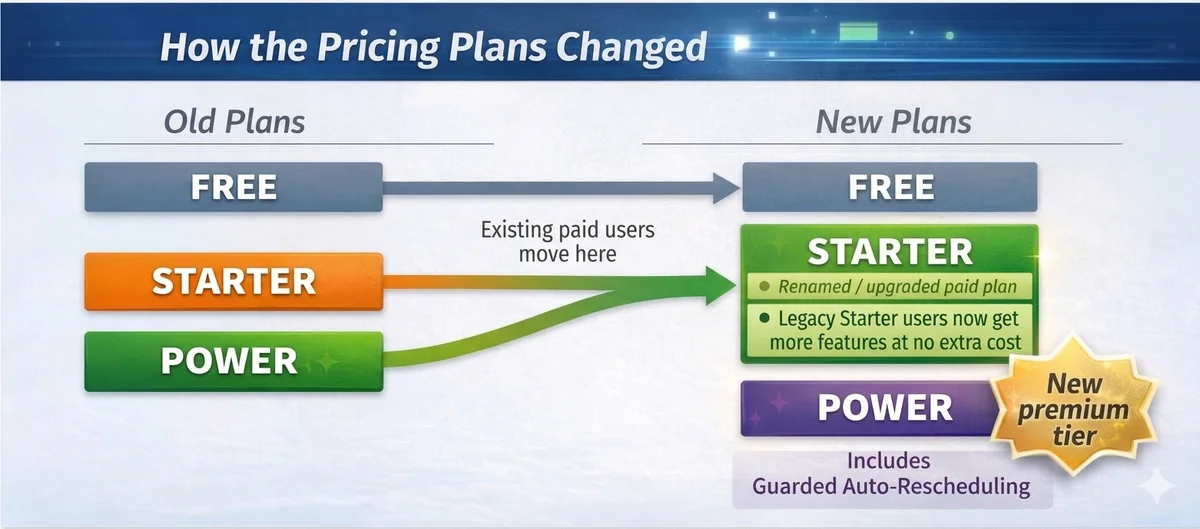
Under the old lineup, users could choose between Free, Starter, and Power. With the new lineup:
the new Starter plan is effectively the old Power plan under a new name
old Power users now continue on that renamed Starter plan
old Starter users are also moved into the new Starter plan, which means they now get a more capable Starter experience without paying extra for that change
the new Power plan is now a higher tier above that renamed Starter plan and is the tier that includes guarded auto-rescheduling
In practical terms, existing paid users keep uninterrupted access to monitoring and alerts, legacy Starter users benefit from a stronger Starter plan for free, and the new Power plan becomes the upgrade path for users who want automation on top of monitoring and alerts.
For the latest plan details, see the current pricing page.
Do you need to update manually?
In most cases, no. Chrome should auto-update the extension to v1.3.0 automatically.
If you want to update immediately:
Remove your current VisaSlotWatch extension
Reinstall from the Chrome Web Store
What is next
This release focuses on shipping the core Power auto-rescheduling flow safely inside the browser.
We will continue refining the surrounding experience, including onboarding, support visibility, and product messaging so the new capability is easier to understand for both Starter and Power users.
The VisaSlotWatch Team
Useful links
Install / Update Extension | View Pricing | Contact Support | Visit VisaSlotWatch